
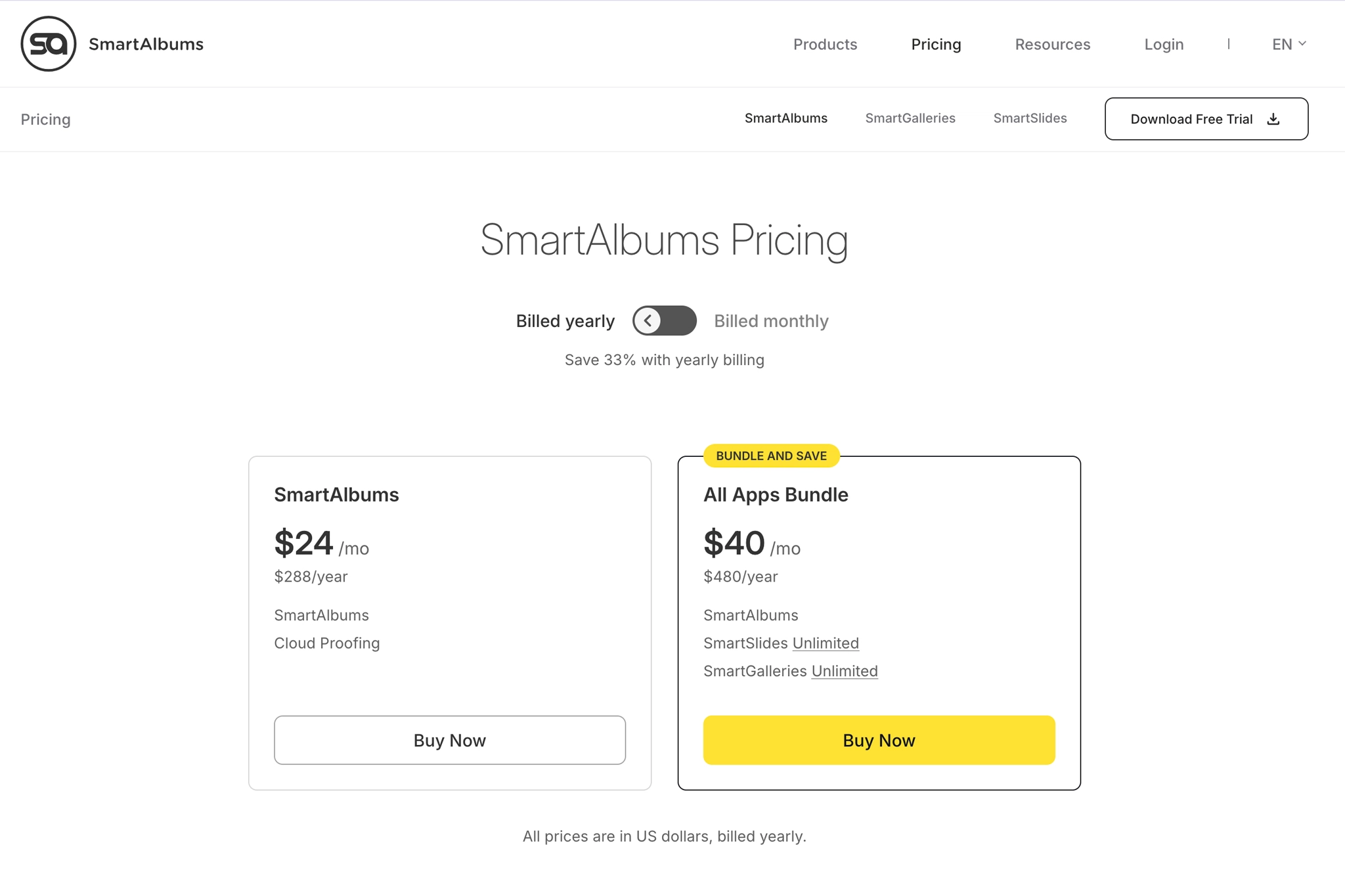
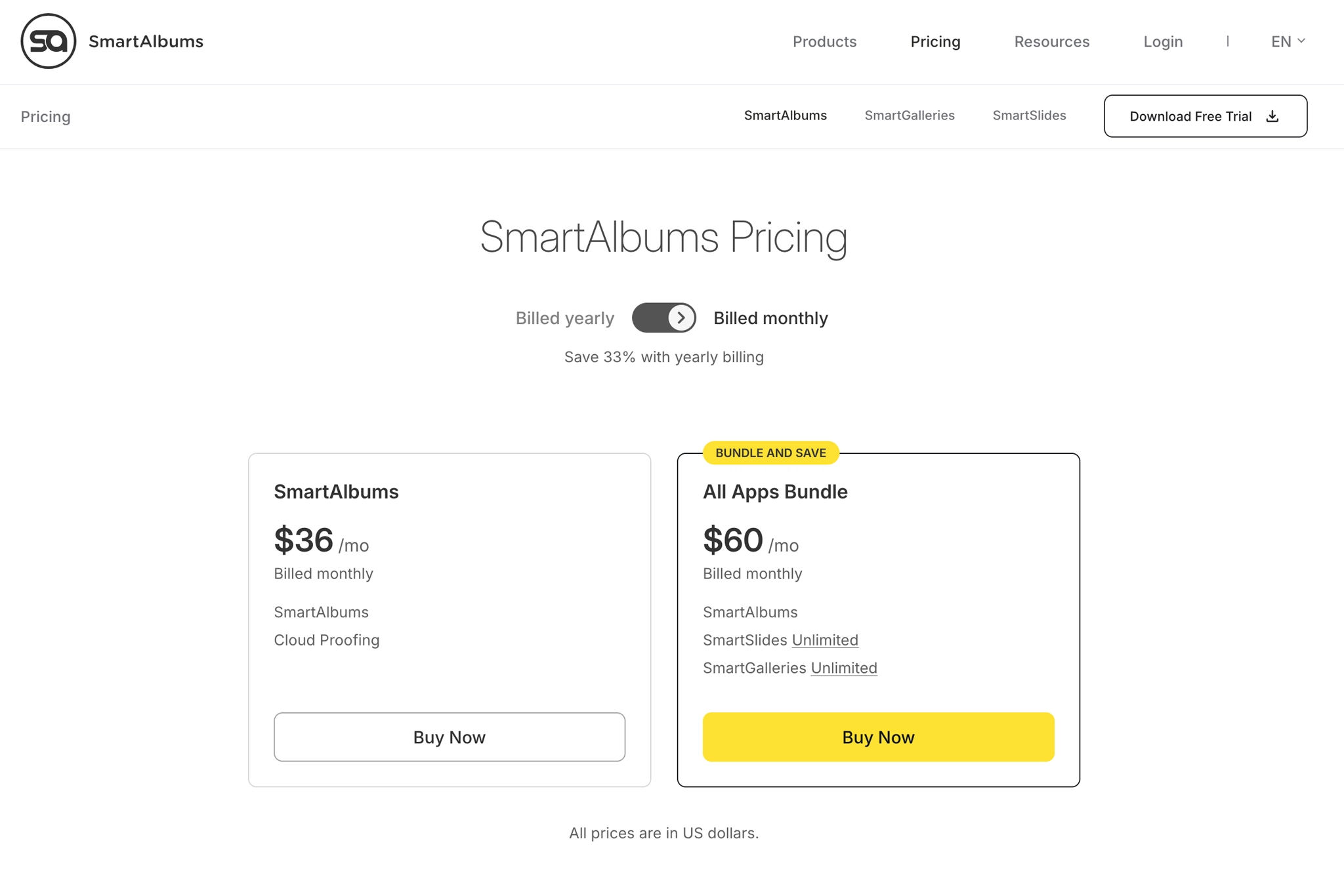
For most wedding and portrait photographers who actively sell albums, or want to increase their photography sales, SmartAlbums is a strong fit. SmartAlbums pricing currently starts at $24 per month when billed annually, or $36 with monthly billing. The standard SmartAlbums plan now includes Cloud Proofing, while photographers who also want SmartSlides and SmartGalleries can choose the All Apps Bundle. Annual plans come with a lower effective monthly price, and you can use CWSPROMO15 to save 15% on whichever SmartAlbums plan you choose.
SmartAlbums Pricing at a Glance
As of September 2026, here is the current annual SmartAlbums pricing:
| Plan | Monthly Billing | Annual Billing | Best for |
| SmartAlbums | $36/month | $24/month | Album design + cloud proofing |
| All Apps Bundle | $60/month | $40/month | Album + proofing + slideshow + galleries |
SmartAlbums now combines professional album design and Cloud Proofing in the same subscription. The All Apps Bundle expands the workflow further by adding SmartSlides and SmartGalleries.
Cloud Proofing is included in SmartAlbums and All Apps Bundle and cannot be purchased separately.
For photographers who know they will use the software throughout the year, the annual plan is therefore the more aggressive value play.
Save 15% on SmartAlbums with CWSPROMO15
Use code CWSPROMO15 when purchasing your SmartAlbums plan.
At the current listed prices, that brings the numbers down to approximately:
| Plan | Monthly after 15% Off | Annual after 15% Off |
| SmartAlbums | $30.60/month | $20.40/month |
| All Apps Bundle | $51/month | $34/month |
The next question is: Which SmartAlbums plan should you choose? Here is how we would choose:
- SmartAlbums: Choose this plan if your priority is professional album design and client proofing. Cloud Proofing is now included, so you can design albums, collect client feedback, and manage revisions.
- SmartAlbums All Apps Bundle: If you want to bring album design, client proofing, gallery delivery and slideshows into one ecosystem, the All Apps Bundle is where SmartAlbums has the best overall value.
For a deeper breakdown of how all apps work together, read our SmartSlides, SmartGalleries and SmartAlbums review.
Annual vs Monthly SmartAlbums Pricing
If you expect to use SmartAlbums consistently, we would choose annual billing. Here is a simple way to look at the cost. Let’s say you net $250 in profit from each album you sell. If you choose annual billing and use code CWSPROMO15 for 15% off, the math looks like this:
- $244.80 annual SmartAlbums cost ÷ $250 = 0.98 albums
- $408 All Apps Bundle cost ÷ $250 = 1.63 albums
In other words, selling just one or two albums could cover an entire year of the software. Your actual album margins will be different, so run the equation using your own numbers. This is why we look at SmartAlbums as a business tool rather than just another subscription. If albums are part of your revenue system, the cost should be judged against the profit the software helps you generate and deliver.
Monthly subscriptions make more sense if you are still testing SmartAlbums. Choose monthly billing if:
- You have never designed client albums before
- Your work is extremely seasonal
- You want to test SmartAlbums beyond the free trial
Choose annual billing if:
- You expect multiple album projects across the year
- Proofing is part of your standard process
- You intend to keep using the software
Is SmartAlbums Worth It?


For portrait, family, boudoir, event, and wedding photographers, SmartAlbums can be surprisingly easy to justify. If you are not currently selling albums, it can help you introduce a new revenue stream without turning album design into another time-consuming task. If you already offer them, the value is even clearer: faster design, easier revisions, and less time spent getting each project ready for delivery.
SmartAlbums Pricing FAQs
Yes. SmartAlbums offers a 14-day free trial with no credit card required. Exported album spreads include a watermark during the trial, which is removed once you purchase a paid plan.
Yes. SmartAlbums is available for both Mac and Windows. A current SmartAlbums subscription includes two activations, which can be used on two Macs, two Windows computers, or one of each.
Yes. Use code CWSPROMO15 to save 15% on eligible SmartAlbums subscriptions. Enter the code at checkout and confirm that the discount has been applied before completing your purchase.
Yes. Cloud Proofing is now included with the standard SmartAlbums subscription as well as the All Apps Bundle. It allows photographers to send album designs to clients for review, collect feedback, and manage revisions without relying on email chains.
Key Takeaways
- SmartAlbums is best suited to photographers who want to make album design faster and easier to manage
- SmartAlbums now includes both album design and Cloud Proofing
- The All Apps Bundle offers the strongest overall value if you also need galleries and slideshows
- Annual billing is the better choice for photographers who expect to use SmartAlbums consistently throughout the year
Affiliate Disclosure: Some links or promo codes in this article may earn us a commission if you buy through them, at no extra cost to you. That does not change our opinion. We recommend tools based on whether they actually fit the workflow.











Leave a Reply