
Studio Ninja pricing currently starts at $16 per month, with Starter, Pro, and Master plans available. Annual pricing is $160 for Starter, $270 for Pro, and $400 for Master. Studio Ninja discounts annual billing compared with paying monthly.
For most working photographers, Pro is the plan we would choose. It removes Starter’s five-active-job limit and adds workflow automation and online booking forms. That is the point where Studio Ninja stops functioning mainly as organized client management and starts taking repetitive work off your plate.
Bonus for readers: If the workflow fits your business, choose an eligible annual plan and use code CLICKWITHSAL50 for 50% off your discounted first 12 months.
Studio Ninja Pricing
Here is the current Studio Ninja pricing in USD:
| Plan | Monthly | Annual | Best for |
| Starter | $16/month | $160/year | Beginners and very low-volume photographers |
| Pro | $27/month | $270/year | Most working photographers |
| Master | $40/month | $400/year | Teams and multi-brands studios |
Studio Ninja advertises yearly billing as roughly 17% cheaper than monthly billing. Another way to look at it is simpler: each annual plan costs roughly the equivalent of ten monthly payments. Studio Ninja also displays GBP and AUD pricing, so your actual currency and applicable taxes may differ.
The cheapest plan is not automatically the best value. Starter looks attractive at $16, but the five-active-job limit and lack of workflow automation can become restrictive as soon as client volume starts moving.
Studio Ninja Pricing With CLICKWITHSAL50
Use code CLICKWITHSAL50 for 50% off eligible Studio Ninja annual plans during the discounted first 12 months. Here is what that does to the current annual pricing:
| Plan | Annual Price | With CLICKWITHSAL50 | Effective Monthly Cost |
| Starter | $160/year | $80/year | $6.67/month |
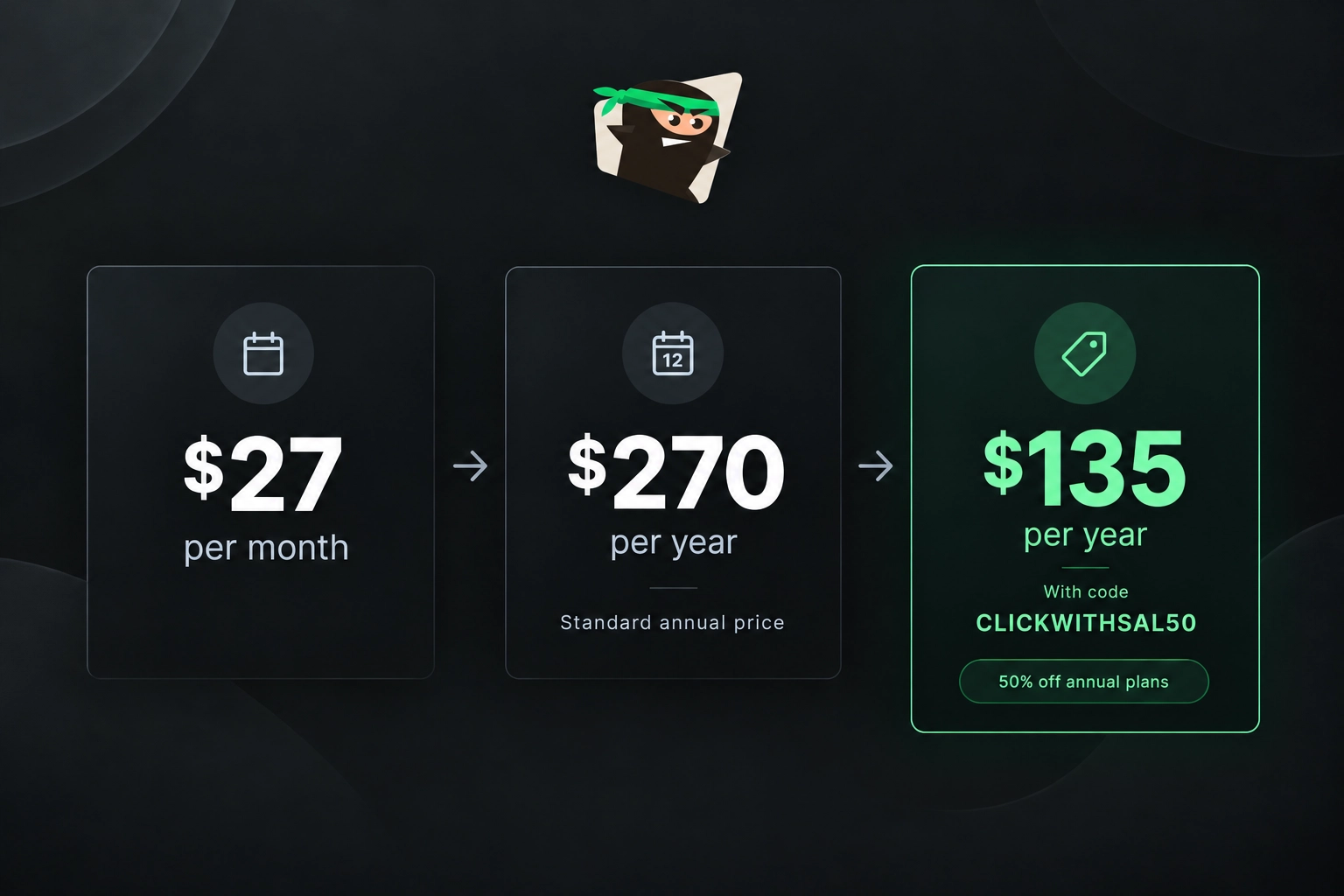
| Pro | $270/year | $135/year | $11.25/month |
| Master | $400/year | $200/year | $16.67/month |
For example, let’s choose Pro. Paying month to month for 12 months costs $324. Standard annual billing reduces that to $270. With CLICKWITHSAL50 applied to the annual plan, the cost drops to $135. For a photographer planning to use Studio Ninja throughout the year, that changes the decision considerably.
Which Studio Ninja Plan Should You Choose?
The right Studio Ninja plan depends less on how advanced you consider your photography business and more on how many jobs, users and workflows you actually need. Here are the differences that actually matter:
- Starter: This is best for photographers who are getting established or managing only a few active clients at once. You still get useful business tools, but the problem is the ceiling. Once inquiries and bookings start overlapping regularly, the limitations become evident.
- Pro: This is our pick for most working photographers. This is the plan where Studio Ninja starts behaving like the system we actually want from a photography CRM. Unlimited jobs removes the operational ceiling, while workflow automation can handle repetitive steps around client communication, reminders, contracts, questionnaires and other job stages.
- Master: If you have multiple photographers or several brands, Master gives you the additional capacity. Most solo photographers do not need it. Paying for Master simply because it is the top plan does not make your workflow better. If Pro already covers your jobs, users and forms, keep the extra money.
Bonus for readers: Automation only helps when the information entering the system is useful. Our free Photography Client Questionnaire gives you the questions to clarify the client’s goals and expectations before the shoot. Get the intake process right first. Then automate what deserves to be repeated.
Studio Ninja Annual vs Monthly Pricing
If you expect Studio Ninja to become part of your regular photography workflow, we would choose annual billing. Annual billing already costs less than keeping a monthly subscription for 12 months. The Studio Ninja promo code CLICKWITHSAL50 makes that gap considerably larger.
Choose monthly pricing if:
- You are still deciding whether Studio Ninja fits your workflow
- Your client business is extremely seasonal
- You do not want to commit after testing it
Choose annual billing if:
- You already know you need a photography CRM
- You have consistent client work
- You want the strongest current value from CLICKWITHSAL50
Do not buy annual simply because the percentage looks good. Test the actual workflow first. Studio Ninja currently gives you a 7-day free trial with no credit card required, which is enough time to get inside the system before making the annual decision.
Studio Ninja Pricing FAQs
Studio Ninja currently starts at $16 per month for Starter. Pro costs $27 per month, while Master costs $40 per month. Annual plans currently cost $160, $270 and $400 respectively.
Yes. Studio Ninja currently advertises annual billing as roughly 17% cheaper than paying month to month. Annual pricing is $160 for Starter, $270 for Pro and $400 for Master.
Yes. Use code CLICKWITHSAL50 for 50% off eligible Studio Ninja annual plans during the discounted first 12 months.
Yes. Studio Ninja currently offers a 7-day free trial with no credit card required, giving photographers time to test the CRM before choosing a paid plan.
Key Takeaways
- Studio Ninja pricing currently starts at $16 per month
- Pro is our pick for most working photographers because it removes the five-active-job limit and adds workflow automation and online booking forms
- Annual billing costs less than paying monthly for a full year, with current annual pricing of $160 for Starter, $270 for Pro and $400 for Master
- Use CLICKWITHSAL50 to save 50% on eligible Studio Ninja annual plans. Pro drops to $135 for the first year, which works out to $11.25 per month
Affiliate Disclosure: Some links or promo codes in this article may earn us a commission if you buy through them, at no extra cost to you. That does not change our opinion. We recommend tools based on whether they actually fit the workflow.











Leave a Reply