
Wondering how long photographers take to edit photos? The process isn’t as simple as sipping matcha in a hammock while the images magically edit themselves. The time frame varies widely, it can take just a few hours, several days, or even weeks. Some edits are done manually with meticulous care, while others can be completed more efficiently using the right tools and workflows.
The Short Answer: It Depends
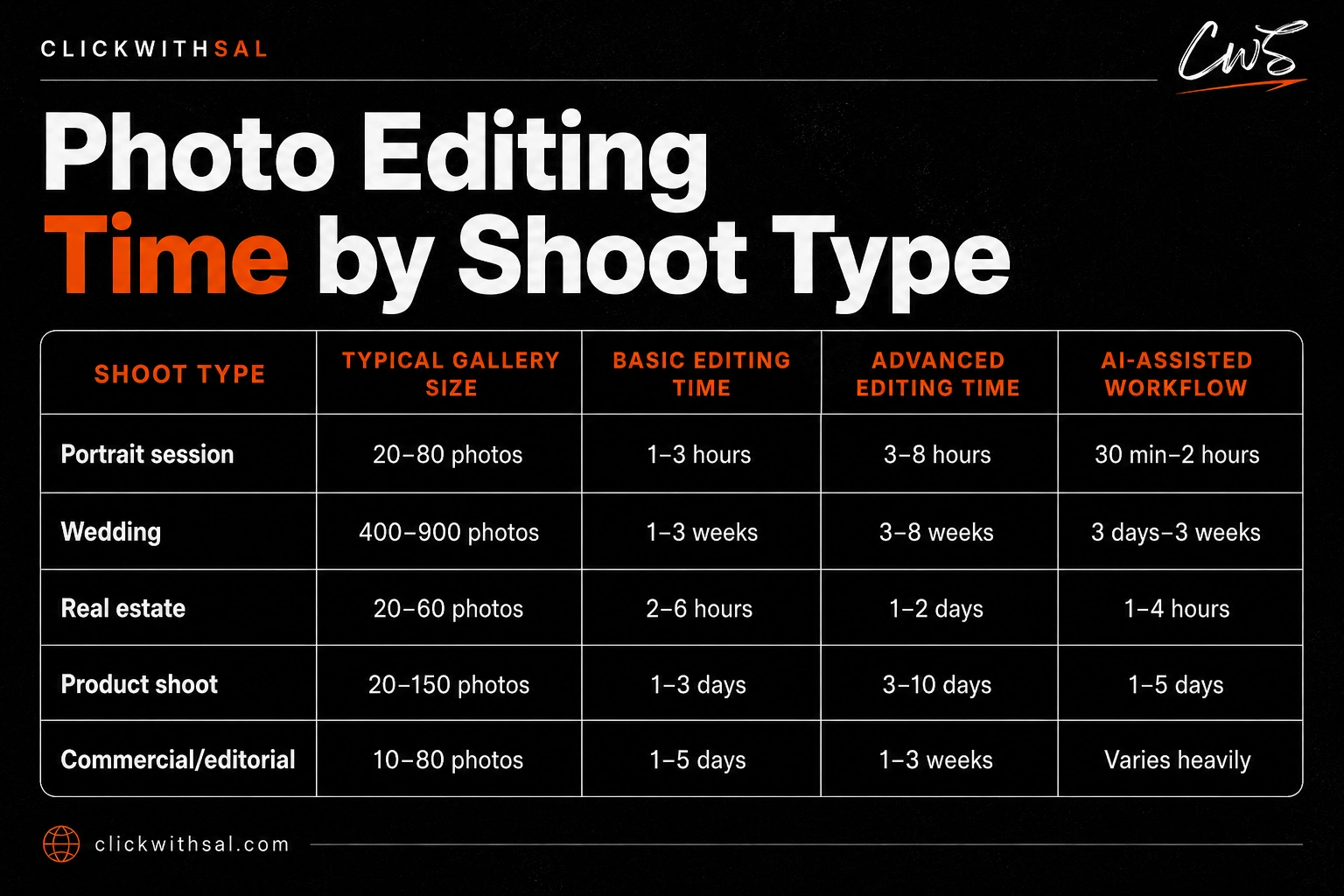
Editing speed isn’t one-size-fits-all. Here’s the truth:
- Quick color + exposure fix: 5–10 minutes per image.
- Full beauty retouch: 30 minutes to 2+ hours per image.
- Event batch edits: 10 photos = ~2–2.5 hours basic / 10+ hours full retouch.
- Portraits with polish: ~20 minutes basic, 1.5 hours pro retouch.
- Wedding delivery timelines: 3–6 weeks average.
- Mega events with hundreds of images: Sometimes months.
The Process: Concept vs Client Delivery


We run two very different editing workflows depending on the purpose, and each comes with its own post-processing timeline:
- For Conceptual & Wall Art Photography: In this case, I edit manually. Every shadow, highlight, and detail is intentional, and it demands surgical precision, especially if the work is meant to become gallery material intended for large-scale printing. I’ll typically spend about one hour per photo, sometimes longer if the piece requires it.
- For Client Batches: For branding or commercial shoots, efficiency is everything. I save hours by using Aftershoot, an AI-powered culling and editing tool that helps me deliver a professional finish without losing days in the process. Its AI retouching feature has been especially valuable, since retouching is often one of the most time-consuming steps in post-production.
Bonus: If you are a photographer, grab our exclusive promo code CLICKWITHSAL15 for 15% off Aftershoot. It can seriously change your workflow.
Why Editing Can Take Even Longer (If You’re Not Careful)

- Over-shooting kills speed: Shooting thousands of frames “just in case” means hours lost culling.
- Ignoring lighting on set: Well-lit shots save time; poor lighting adds hours.
- Over-retouching spirals fast: Trying to perfect every pore or remove every background speck can eat entire afternoons.
- Lack of a clear vision: Shooting without strong art direction means endless second-guessing in the edit.
Save Time, Keep Quality

- If you’re a photographer: Invest in presets, like our Lightroom preset collection, for a consistent, solid base, then refine details where needed. Value your time. Don’t burn out hand-editing 2,000 shots when AI can streamline 80% of the process. (Don’t forget: CLICKWITHSAL15 for 15% off Aftershoot.)
- If you’re a client: Be patient; quality takes time, and fast returns often mean cutting corners. In the best scenario, it means your photographer has a streamlined workflow and possibly uses smart editing tools.
How Long Do Photographers Take to Edit Photos FAQs
A simple color and exposure edit can take around 5 to 10 minutes per photo. A polished portrait edit may take 20 to 30 minutes, while detailed beauty retouching can take 1 to 2 hours or more depending on skin cleanup, background distractions, color grading, and final delivery quality.
Photographers do more than apply a filter. They usually cull the best images, correct exposure and color, refine skin and details, remove distractions, export files, and prepare the final gallery. Large shoots, poor lighting, heavy retouching, and busy client schedules can all stretch the delivery timeline.
Yes, AI editing tools can speed up repetitive tasks like culling, batch editing, color consistency, and some retouching steps. The best results still need human judgment.
Final Takeaway
Photo editing isn’t a delay; it’s a craft. Time varies because the purpose varies. It can take 10 minutes, or it can take hours. The trick is knowing when to slow down and when to let smart tools do the heavy lifting.
Ready to slash your editing time and keep pro-level results?
Grab Aftershoot today, start saving hours this week, use our exclusive promo code CLICKWITHSAL15 and lock in 15% off.
Affiliate Disclosure: Some links or promo codes in this article may earn us a commission if you buy through them, at no extra cost to you. That does not change our opinion. We recommend tools based on whether they actually fit the workflow.











Leave a Reply