
Shine on the face is one of the most common issues after a photoshoot. It usually comes from flash, strong studio lighting, heat, oily skin, or angles where the light hits the forehead, nose, and cheeks too hard. The best correction in post is to reduce face shine while keeping the texture polished and natural. Manual retouching can handle it, but it is a very time-consuming task. AI retouching is the fastest way to remove shine on face when you need cleaner hotspots, and consistent shine reduction without wasting hours on repetitive skin work.
Bonus for readers: Try Aftershoot for retouching and use code CLICKWITHSAL15 for 15% off. It makes the most sense if you edit batches, not just one portrait once in a while.
What Face Shine Actually Is in Portrait Photos


Face shine is a highlight caused by light bouncing off the skin in a concentrated way instead of spreading softly across the face. It usually shows up on the forehead, the tip of the nose, the upper cheeks, and the chin. Not all shine is a problem. A little glow gives skin shape and dimension. The issue starts when shine becomes the brightest thing in the frame and begins stealing attention from the eyes.
The best way to remove shine from a face in a photo is to target only the shiny hotspots. Lower the harsh highlights without heavy smoothing, so the skin still looks real and the original direction of light stays intact.
Before you shoot: Some shine problems start during capture, especially with harsh flash, uncontrolled studio light, or light spilling across the face. We cover the lighting modifiers and support gear we use for more controlled portrait light in our shooting gear guide.
How to Remove Shine On Face In Photo Using Afteshoot
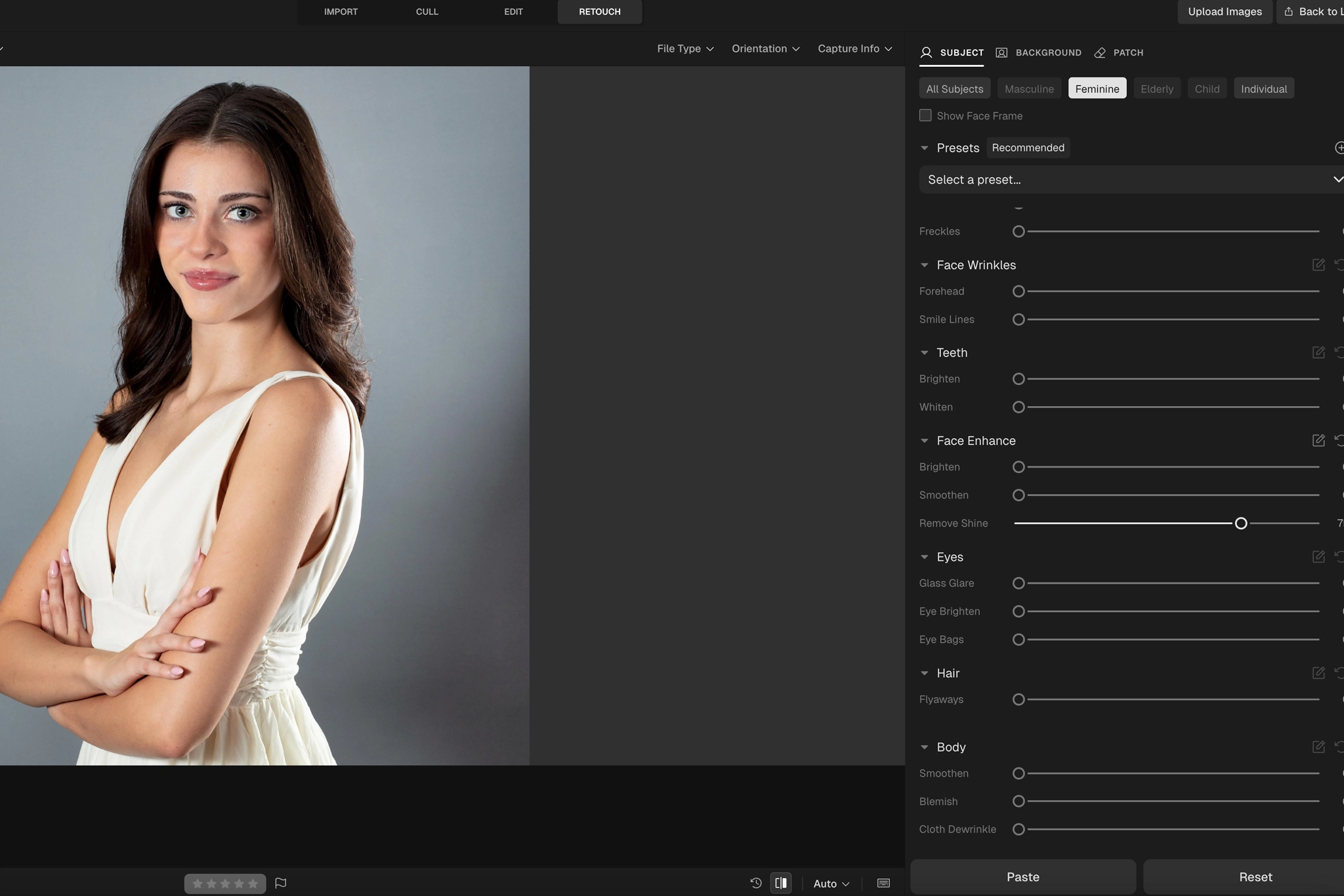
In Aftershoot, the face shine remover workflow is simple:
- Import your photos into Aftershoot
- Go to retouch
- Select the subject retouching controls
- Adjust the remove shine slider
- Preview the result before exporting
Aftershoot retouching makes the most sense for:
- Wedding galleries
- Event portraits
- Studio headshots
- Family sessions
- Branding sessions
Basically, it works best for large batches where manual retouching stops being a smart business decision and becomes a time drain. That is where an automated retouching workflow becomes an actual solution.
If you only edit one portrait every few months, Aftershoot probably is not worth buying just for face shine removal. If you photograph people regularly, it becomes much more valuable because shine removal is only one part of the full workflow. The math changes when you are paying to reduce repetitive editing decisions across multiple sessions, not just fix one shiny forehead. That time can go back into bookings, client delivery, business optimization, or simply getting your life back from the edit queue.
Bonus for readers: Use code CLICKWITHSAL15 for 15% off Aftershoot if you want to test whether the retouching tools fit your workflow.
The Natural Skin Rule
Shine is not always the enemy. Bad shine is. Good shine gives the face dimension, shape, and a sense of real light. Bad shine looks like a white patch sitting on top of the skin instead of belonging to it. Before you remove shine, ask:
- Is this shine distracting?
- Is it brighter than the eyes?
- Does it make the skin look oily or sweaty?
- Does it break the mood of the photo?
- Would reducing it improve the image, or just make it look over-edited?
If the answer is yes, reduce it. If the shine feels like natural glow, leave it alone.
Here are the most common mistakes to avoid when removing shine from face photos:
- Making the skin too matte: Portraits need light, depth, and texture. The goal is controlled shine, not flat skin.
- Editing the whole face instead of the hotspot: Most face shine is local. The forehead, nose, or cheeks may need attention, but the rest of the face might already look right or need a different adjustment.
- Ignoring the lighting direction: Shine should be softened in a way that still respects where the light is coming from. Otherwise, the portrait can start to look fake.
- Over-retouching: With wedding, event photography, clean the distraction and move on. The edit should improve the photo without making the skin look processed.
Photo editing matters, but face shine can also be reduced during the shoot by:
- Softening the light
- Changing the subject’s angle
- Avoiding direct hard flash unless it fits the look
But real shoots are not always perfectly controlled. People sweat. Events run late. Studio lights hit skin differently than expected. A face that looked fine on the back of the camera can look too shiny once you review the full gallery. That is why an efficient professional AI retouching tool is valuable. It gives photographers a faster way to clean up shine without turning every photo into a tedious manual task.
Reduce Shine, Do Not Erase The Face
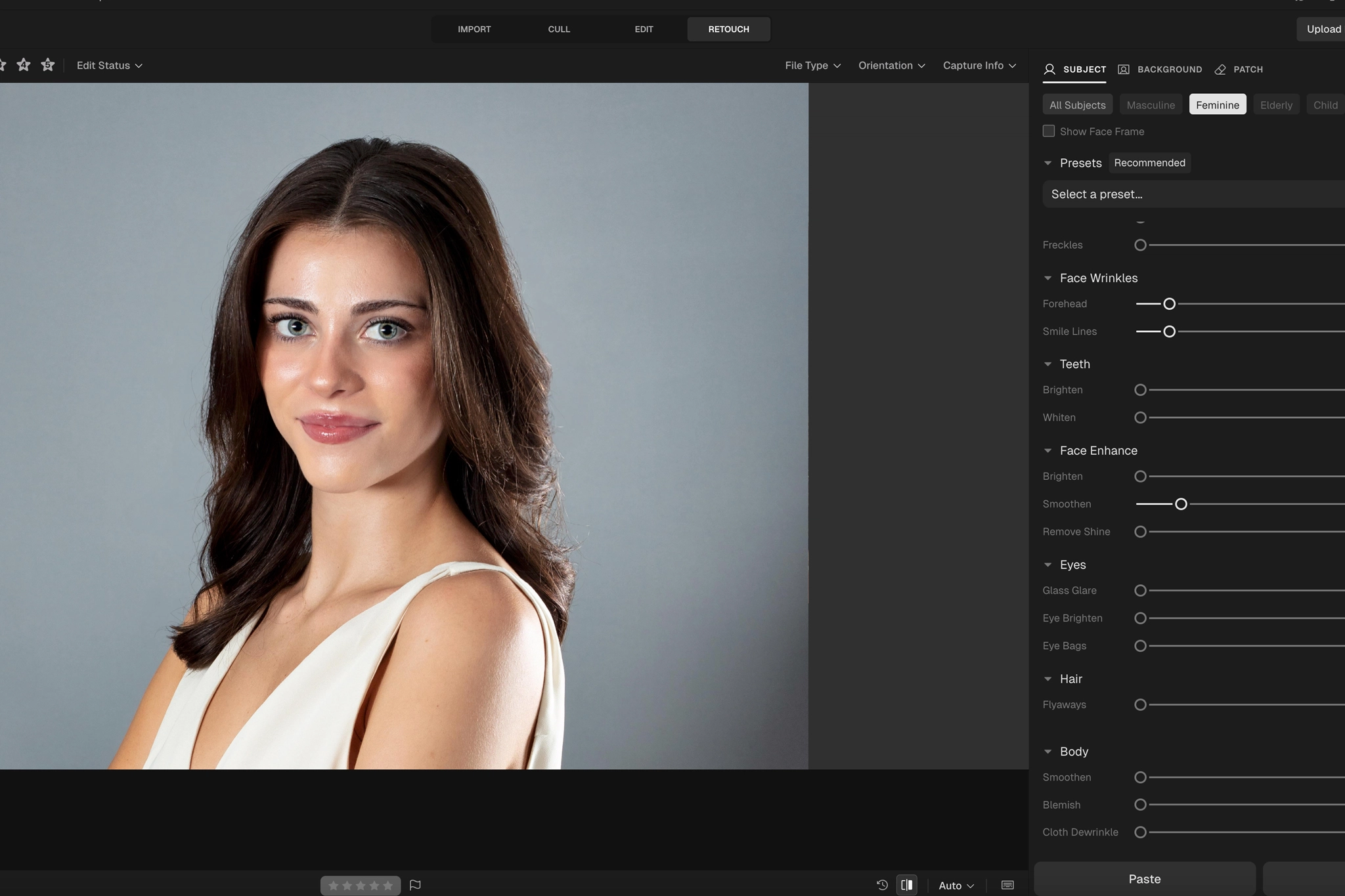
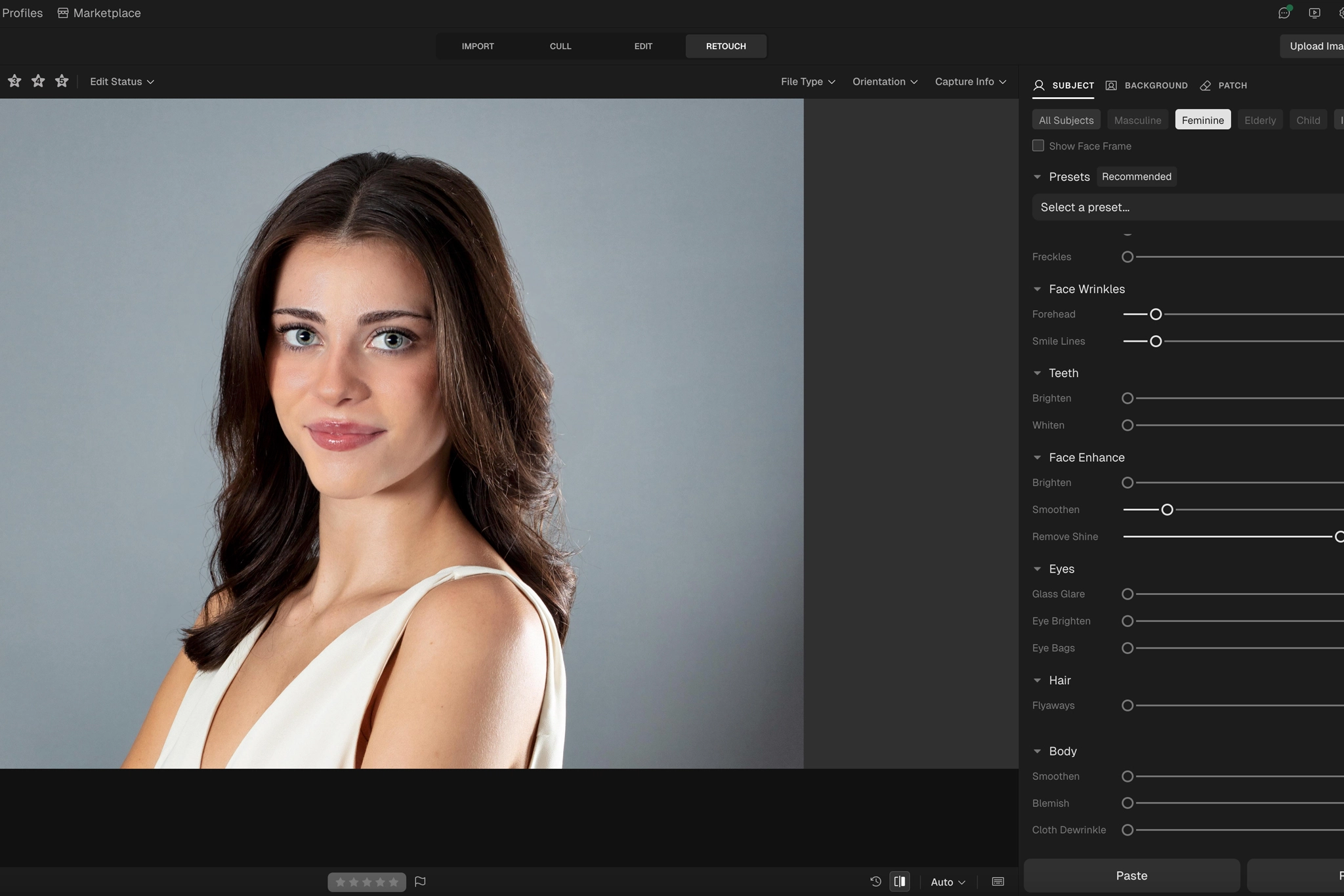
For photographers editing full galleries, Aftershoot is the cleaner business move. It gives you a faster way to reduce glare without pushing the skin into that fake, cheap-looking, over-polished result. Keep your eyes and judgment involved, because the goal is controlled highlights.
Bonus for readers: Try Aftershoot with code CLICKWITHSAL15 for 15% off if you want faster face shine removal inside a real photographer workflow.
How To Remove Shine On Face In Photo FAQs
The best way to remove shine on a face in a photo is to reduce only the distracting hotspots on the forehead, nose, cheeks, or chin. Do not smooth the entire face. Lower the harsh highlights while keeping natural skin texture.
No. Removing all shine can make skin look flat, fake, and over-processed. A little natural glow gives the face dimension. The goal is to reduce distracting shine, not erase every highlight.
Shiny skin in photos usually comes from flash, strong studio lighting, heat, sweat, oily skin, or an angle where light reflects too strongly off the face. It often appears on the forehead, nose, cheeks, and chin.
Yes. Aftershoot includes retouching tools that can reduce face shine and harsh skin highlights. It works best for photographers editing batches of portraits, weddings, events, headshots, or branding sessions where manual retouching would take too long.
Key Takeaways
- Face shine usually comes from flash, strong lighting, heat, sweat, oily skin, or harsh light angles
- The goal is to reduce distracting hotspots, not remove every bit of natural glow
- Good face shine removal keeps skin texture, shape, and light direction intact
- Manual retouching can work for one image, but it becomes a time drain across large sessions.
- Aftershoot makes the most sense for photographers editing full galleries or repeated portrait batches
- Use code CLICKWITHSAL15 for 15% off Aftershoot if you want a faster retouching workflow
Affiliate Disclosure: Some links or promo codes in this article may earn us a commission if you buy through them, at no extra cost to you. That does not change our opinion. We recommend tools based on whether they actually fit the workflow.














Leave a Reply