
If you are wondering how much is Aftershoot in 2026, the important thing to know is that Aftershoot pricing is now organized around workflow needs: culling, editing, retouching, or the complete AI workflow. Instead of only thinking in terms of old plan names, photographers should choose based on which part of post-production slows them down the most.
We keep this page updated when pricing or promos change, so make sure to bookmark it. Right now, you can get 15% off any Aftershoot paid plan with our exclusive code CLICKWITHSAL15. This coupon can save you hours of editing, keep it handy.
Aftershoot Review
Aftershoot is an AI-powered editing tool designed for culling, editing, and retouching your photos. If you are new to Aftershoot, read our full review to learn more and discover the best way to use it for your workflow.

It’s important to note that Aftershoot is subscription-based. If you shoot frequently, this provides better value compared to other AI photo culling tools that charge per image.
Aftershoot Pricing Overview
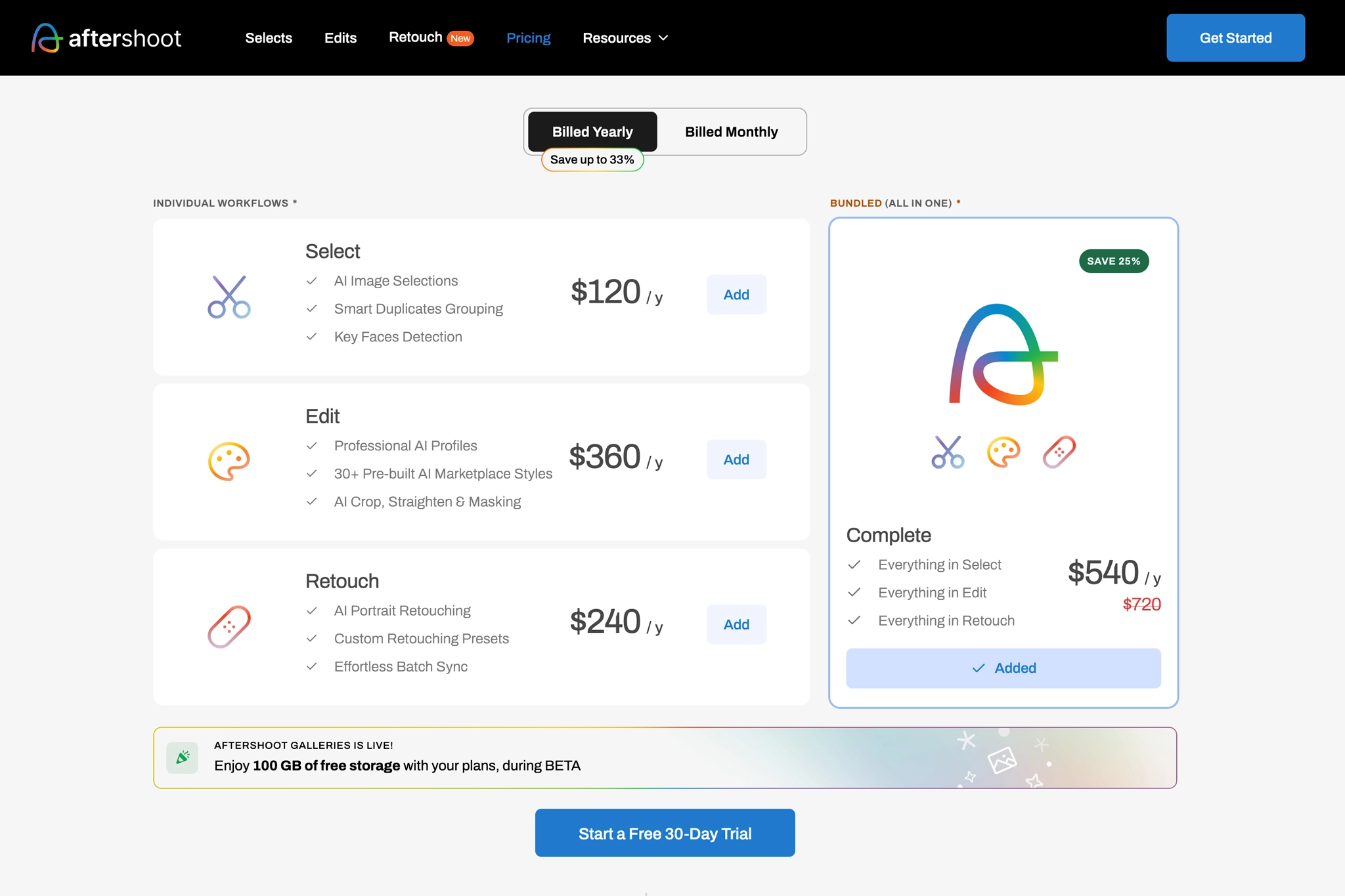
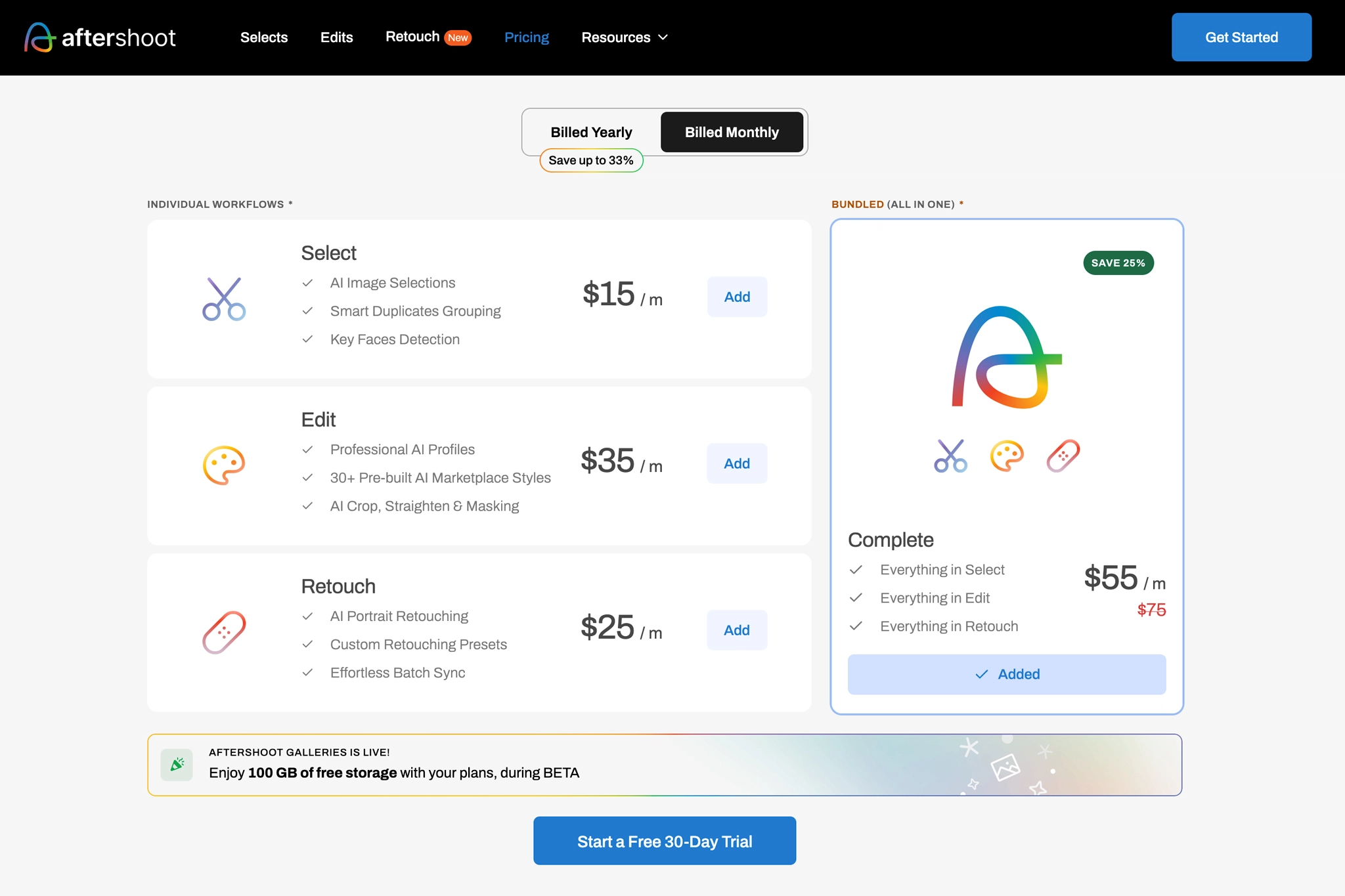
Aftershoot pricing is now organized around the main parts of a photographer’s post-production workflow: culling, editing, retouching, and complete workflow automation.
The current official pricing structure includes:
- Select: Best for photographers who mainly want faster image selection
- Edit: Best for photographers who want AI-powered editing without manually adjusting every gallery from scratch
- Retouch: Best for photographers who need faster skin and detail cleanup
- Complete: Best for photographers who want culling, editing, and retouching inside one connected workflow
This structure makes the choice clearer. Instead of paying for a broad plan you may not fully use, you can choose the part of the workflow that creates the biggest bottleneck in your business.
Which Aftershoot Plan Should You Choose?
Here’s the clean breakdown:
| If your biggest problem is | Choose |
| Sorting through thousands of images | Select |
| Getting consistent edits faster | Edit |
| Speeding up skin and detail cleanup | Retouch |
| Managing the full post-production process | Complete |
If you only need help selecting images, Select is the leanest option. If your bottleneck is color consistency and editing speed, Edit makes more sense. If your biggest time drain is polishing portraits, Retouch may be the better fit. If you want Aftershoot to handle the full post-production chain, Complete is the strongest option.
Is Aftershoot Worth It?
Aftershoot is worth it if your time matters. Even occasional shooters can benefit from it as a professional tool and a luxury option to have. For those who shoot commercial work, weddings, and events consistently, it becomes an essential part of your business infrastructure.
If you’re already considering it, use code CLICKWITHSAL15 for 15% off Aftershoot plans.
How Much is Aftershoot FAQs
Aftershoot pricing depends on which part of your workflow you want to automate. Select is for image selection, Edit is for AI editing, Retouch is for portrait cleanup, and Complete is for photographers who want culling, editing, and retouching in one system.
The cheapest Aftershoot plan is Select. It is best for photographers who only need help sorting, rating, and narrowing down large galleries faster. If you also want AI editing or retouching, you will need a higher plan.
Aftershoot offers subscription pricing, and the best value is usually the annual option. Monthly billing can make sense if you want more flexibility, but yearly billing usually lowers the effective monthly cost.
No, Aftershoot is not mainly built around per-image pricing. Its value comes from unlimited workflow use, which can be a better fit for photographers who process large galleries, weddings, portraits, events, or commercial shoots.
Yes. You can use promo code CLICKWITHSAL15 to get 15% off a paid Aftershoot plan.
Key Takeaways
- Aftershoot pricing is subscription-based with unlimited usage, not per image
- The best starting point depends on your bottleneck. Choose Select if selection is your problem, Edit if consistency is your problem, Retouch if cleanup is your problem, or Complete if you want the full system
- Edit and Complete options are the most relevant if you want Aftershoot to support your editing style across full galleries
- If time matters, Aftershoot is less an expense and more of a workflow upgrade
Stop editing like it’s 2016. Try Aftershoot with promo code CLICKWITHSAL15, then use the hours you get back to refine your work and grow your photography business.
Affiliate Disclosure: Some links or promo codes in this article may earn us a commission if you buy through them, at no extra cost to you. That does not change the opinion. We recommend tools based on whether they actually fit the workflow.










Leave a Reply